The firmware versions 10.0.x are not backward compatible (in terms of configuration) to the older firmware versions.
Read carefully this chapter to optimize the transition from the older versions of firmware to the 10.0.x firmware version.
ThinMan Important Info - Read Carefully
To correctly manage the 10.0.x firmware version you need a ThinMan version 7.5.0 or greater.
¶ Configuration after the upgrading process
As mentioned earlier the firmware 10.0.x cannot maintain the configuration of the device where it is installed.
UPGRADE WARNING Be aware that a firmware upgrade to 10.0.x (from previous versions like 9.5.x, 9.4.x, 9.3.x, 9.2.x, 9.1.x, 8.8.x or older) will lose all the configuration made on a device (e.g. upgrading a device from 9.5.x to 10.0.0 firmware version will lose all the configuration data).
After the installation process, the device will be put in a factory default configuration and then it will start as explained in Initial Installation chapter.
Depending on the way you previously configured the devices, you will have a different impact on this issue.
See chapters below to find the most appropriate procedure.
¶ Devices previously configured through ThinMan Configuration or manually
If you:
- manually configured your devices, or
- used the ThinMan Remote Assistance to configure them (this is anyway a manual configuration), or
- configured your devices one by one using the Receive and Send Configuration command available on ThinMan,
then after the firmware upgrading process, you have to re-configure the devices using the same configuration approach: manually, using Remote Assistance or through the Receive and Send Configuration commands on Thinman.
Template files and configurations for Receive and Send Configuration commands
Notice that also your old offline configuration (on ThinMan) or your old template configuration files will not be compatible with the new firmware version.
In the case you have a unique device configuration that has to be available on all your devices, the best procedure can be:
- upgrade a single device,
- configure it from default factory,
- use ThinMan to read its configuration (Configuration -> Receive command),
- save the configuration into a Template,
- manually push the configuration (previously stored in the template file) to all other devices.
In both of these cases, we suggest thinking about using the ThinMan Profile Manager. This allows you to automatically push configuration on the devices and allows to easily maintain many configuration profiles in your network. See the ThinMan Guide for more information on Profile Management.
¶ Devices previously configured through ThinMan Profile Manager
If you used the ThinMan Profile Manager to push configuration on the devices, then the approach will be much simpler.
Configuration Sets are not compatible
Notice that the Configuration Sets used by old firmware versions are not compatible with the firmware version 10.0.x.
In this case, before the start of the upgrading process, you have to create new Configuration Sets. This has to be done for every device profile or user profile you have in the Profile Manager.
The steps for this process are:
- upgrade a single device,
- configure it (the configuration has to be the same as that contained in a device profile or user profile),
- read the configuration on the device (using ThinMan),
- save it as a Template file,
- create a Configuration Set in the Profile by reading its configuration from the template file
These steps (except the first) has to be executed for every Profile (Device or User) that is used to push configuration on your devices.
Once all the configuration sets are created you can upgrade the firmware on your devices (using manual or automatic upgrade through ThinMan). The upgrade of the firmware will put your devices in a default factory configuration, but the Profile Manager will immediately push the correct configuration profile (using the newly created Configuration Sets) on those devices using the same Policies already present in the Profile Manager.
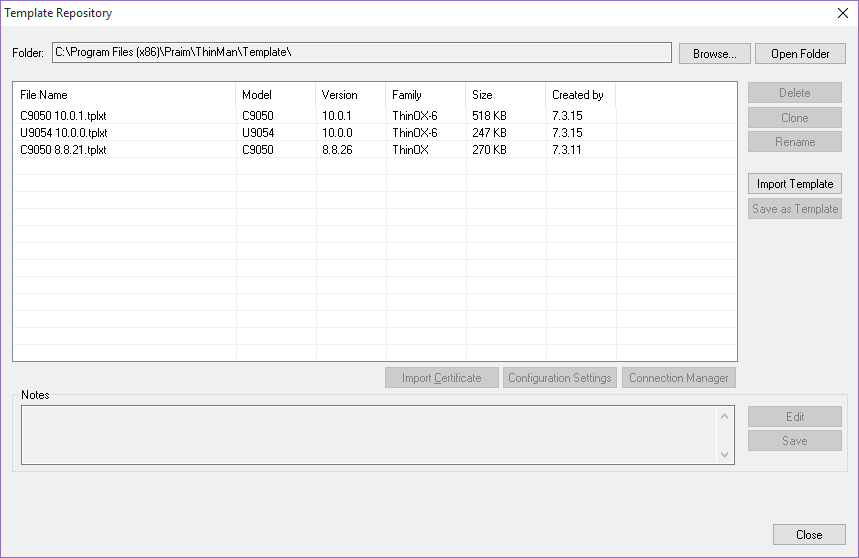
Using the Template Repository you can easily find the compatibility between templates and their respective configuration information. The Family attribute indicates the configuration compatibility between device models and firmware versions. Having templates with the same Family means that the template (and its configuration content) are compatible. In the case above, firmware version 8.8.26 and 10.0.0 are not cross-compatible (even if the model C9050 is the same for both).